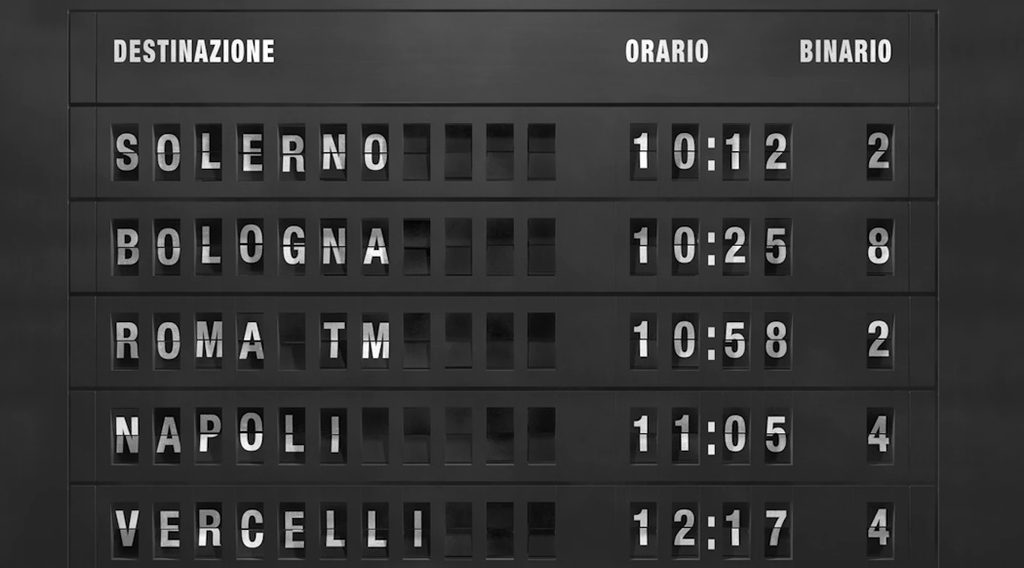
Few sights and sounds are quite as evocative of old-school rail travel as the rhythmic, rapid-fire clatter of a mechanical split-flap display (often called a Solari board, after Italian manufacturer Solari di Udine). Before digital screens took over station concourses, rows of hinged black-and-white or warm-tinted flaps flipped one after another until destinations, departure times, and track numbers clicked into place.
To recreate that feeling just for fun, I put together a Python script that renders a two-row split-flap departure board—complete with a subtle foreshortening fold effect, staggered column settle times, a warm vintage amber glow, and a synchronized mechanical clatter sound exported to an .mp4 video.
Play the actual outputs from my project as a video with audio below:
How the Animation Works
The script uses three libraries:
Pillow (PIL) to draw each individual flap cell, center the character, simulate the top half folding downward, and stitch rows onto a dark board background.
NumPy to convert each rendered Pillow image into an array that video frames can consume cleanly.
MoviePy to assemble the sequence of frames at 30 FPS, attach a trimmed mechanical flip sound effect, and export a playable .mp4 with audio.
Simulating the Flap Fold
Rather than building a full 3D engine, render_single_flap() fakes the mechanical flip in two parts:
It draws the character centered inside a dark panel and adds a crisp horizontal split line down the middle.
When fold_progress > 0, it crops the top half of the cell, squashes its vertical height (new_top_h), blends in a slightly darker shade to mimic angle/shadow as the flap tips forward, and pastes it back just above the split line.
Staggered Cascade & Audio Sync
Real boards don’t stop every letter on the exact same millisecond. Each column in each row gets a random stop_steps target (for example, 55 to 120 steps). Since each step renders two frames (one mid-fold, one settled) at 30 FPS, 120 steps spans up to 240 frames (8.0 seconds), keeping flaps clattering right up against the end of a ~7-second sound clip before holding on the final departure details for 3 seconds.
Two Rows & Warm Vintage Tint
Row 1 left-aligns the destination (PADDINGTON) and right-aligns the departure time (08:15) within a configurable column width (COLS = 20).
Row 2 formats a two-digit track number (TRK 03) followed by a space and status (BOARDING).
Switching TEXT_COLOR to (255, 224, 168) over dark charcoal-brown panels (36, 33, 28) gives the characters a soft, warm-white/amber station glow instead of stark digital white.
Try It Yourself
1. Install the dependencies:
pip install pillow moviepy numpy2. Get a sound clip
Grab a free split-flap, flip-clock, or mechanical click sound effect (e.g., from Pixabay or Freesound), place it alongside your script, and update AUDIO_FILE accordingly.
3. Grab the code and modify to your needs
The full code is available from my Github repo.
Things to Try Yourself
Swap in classic rail destinations like KINGS CROSS, ST PANCRAS, BRIGHTON, or EDINBURGH (and bump up COLS value accordingly if a station name is longer than 14 characters).
Try different status messages like ON TIME, DELAYED, or ALL ABOARD, or experiment with a left-to-right sweep in stop_steps.
Try making it into a single row, or more than 2 rows (showing Status and Track in different rows for example).
Build a schedule for airplane schedule showing Departure (or Arrival) information with Gate number, Flight number, Origin, Destination, Status.
🤔 🧠 The Italian manufacturer Solari di Udine popularized these boards in the 1950s and 1960s, becoming the dominant supplier for major railway stations and airports worldwide. Their brand name became synonymous with the technology—much like Kleenex or Xerox. The Solari family had been making tower and mechanical clocks in northern Italy since 1725. After setting up a new factory in Udine in 1948, brothers Remigio and Fermo Solari—working closely with industrial designer Gino Valle—adapted flipping-leaf mechanisms from clocks into large-scale public information displays. The first railway information display installation by Solari was at Liège station in Belgium in 1956.
Want to know how a mechanical Split-flap display works? Check out this video.
Explore this blog site for more tips and articles. Also, check out my YouTube channel.
